ROS2 Manipulation Control Lab
👋 Hello again, Future Roboticists!
Welcome to the second lab session! 🚀
In this lab you will:
- Connect MATLAB (Windows host) to a UR robot simulation running in Gazebo (Ubuntu VM) via ROS 2.
- Use a FollowJointTrajectory action to command joint-space trajectories.
- Design a simple sequence of joint-space motions that look meaningful on the robot.
- Log /joint_states and plot how the joints move over time.
This builds on Lab 1 (publishers and subscribers) and introduces ROS 2 actions and joint‑space control of manipulators.
Equipment
- Your personal PC with the Virtual Machine running
- Matlab, 2025a to 2026a, nothing older, nothing newer!
- Good mood!🌈
Report
There is no need to hand in a report for this lab. Answer the questions directly in the Matlab script, and discuss your findings with the lab manager. We will be going around the room, helping and checking your progress.
Instructions
Virtual machine and ROS2 setup
- Turn on your VM
- Log in with the password: robotics
The default middleware that ROS 2 uses for communication is DDS (Data Distribution Service). In DDS, the primary mechanism for having different logical networks share a physical network is known as the Domain ID. ROS 2 nodes on the same domain can freely discover and send messages to each other, while ROS 2 nodes on different domains cannot. All ROS 2 nodes use domain ID 0 by default. To avoid interference between different groups of computers running ROS 2 on the same network, a different domain ID should be set for each group. So each student will have a domain ID given to you by the teacher. It will be a number between 0 and 101, inclusive. This domain ID has to be given to the turtlebot and to your virutal machine.
Open a terminal:
ubuntu@ubuntu:~$ nano ~/.bashrc
This will open a file in the terminal, with the arrows go all the way down until you find: ROS_DOMAIN_ID=24
Change the 24 with your personal domain ID, then save and close the file with Crtl + s then Crtl + x
You then need to source the file you just modified, this is done with this command:
ubuntu@ubuntu:~$ source ~/.bashrc
Matlab programming
On your host PC, open Matlab and copy paste the following code in a new script, then start following the instructions in the comments and the %TODOs. Good luck! 🍀
%% LAB 2 – Controlling a UR Robot in Gazebo from MATLAB (ROS 2)

% In this lab you will:
% - Connect MATLAB (Windows host) to a UR robot simulation running in Gazebo (Ubuntu VM) via ROS 2.
% - Use a FollowJointTrajectory action to command joint-space trajectories.
% - Design a simple sequence of joint-space motions that look meaningful on the robot.
% - Log /joint_states and plot how the joints move over time.

% This builds on Lab 1 (topics and messages) and introduces ROS 2 actions and joint‑space
% control of manipulators.

%% Lab 2 - Setup

% 1- Start the VM
% 2- Log in with the password: robotics
% 3- Open a terminal:
%    - cd ros2_ws/
%    - source install/setup.bash
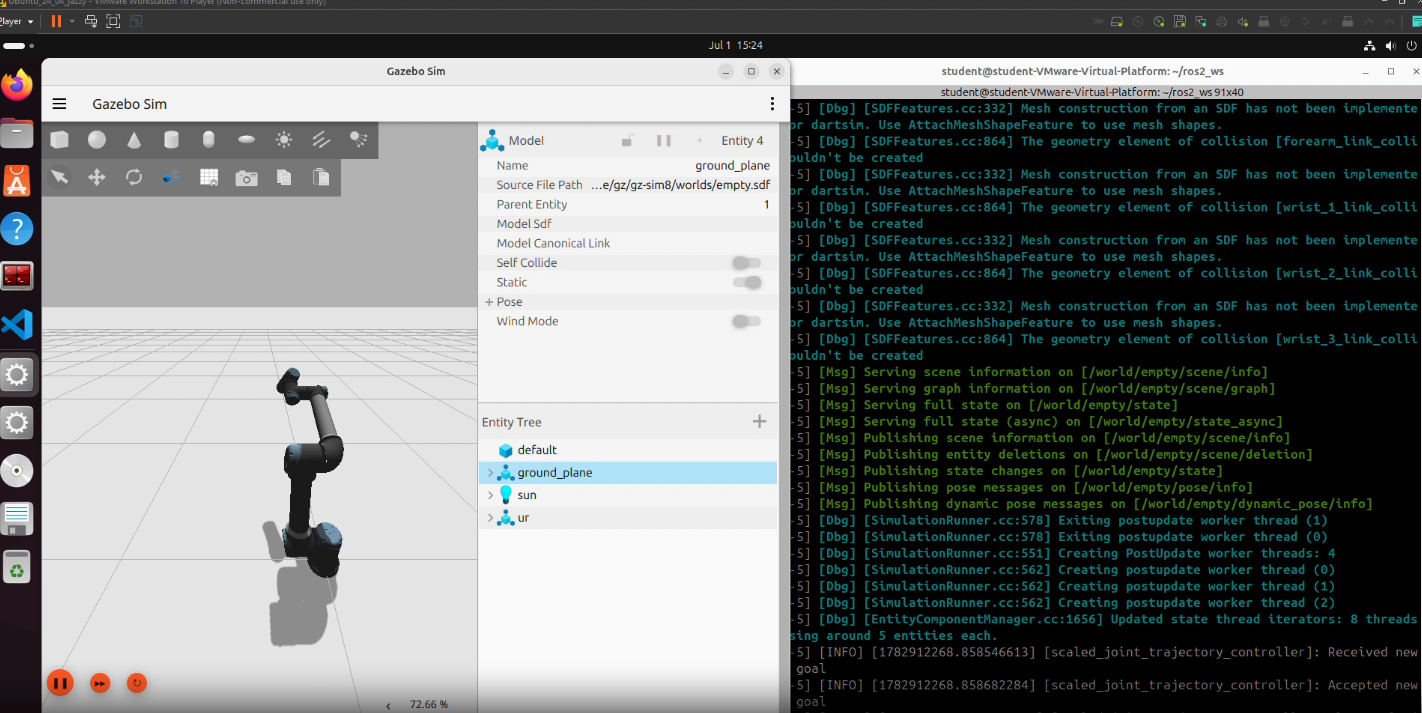
%    - ros2 launch ur_simulation_gz ur_sim_control.launch.py

% This should start:
% - Gazebo with the UR arm
% - RViz with the UR model.
% - Controllers, including scaled_joint_trajectory_controller.

%% Lab 2 - Part A: Setup ROS 2 and action server client
clc
clear

% Set the ros domain id and create a new ros node
% TODO
% TODO

% Check the ROS 2 interfaces

disp("ROS2 topics:");
ros2("topic", "list");

disp("ROS2 actions:")
ros2("action", "list");

% Create the action server client

controllerName = "scaled_joint_trajectory_controller";

joints = { ...
    'shoulder_pan_joint', ...
    'shoulder_lift_joint', ...
    'elbow_joint', ...
    'wrist_1_joint', ...
    'wrist_2_joint', ...
    'wrist_3_joint' };

% Define the action type and name
actionType = "control_msgs/FollowJointTrajectory";
actionName = "/scaled_joint_trajectory_controller/follow_joint_trajectory";


% Create the client
client = % TODO

disp("Waiting for FollowJointTrajectory action server ...");
waitForServer(client);
disp("Action server available.");

%% Lab 2 - Part B: Single trajectory example

% 1. Create JointTrajectory prototype
traj = ros2message("trajectory_msgs/JointTrajectory");
traj.joint_names = joints;

% 2. Define two points
pt1 = ros2message("trajectory_msgs/JointTrajectoryPoint");
pt1.positions      = [0, -1.0, 1.0, -1.5, -1.5, 0];  % in radians
pt1.velocities     = zeros(1,6);
pt1.accelerations  = zeros(1,6);
pt1.time_from_start.sec = int32(3);
pt1.time_from_start.nanosec = uint32(0);
pt1.effort = [];
pt1.accelerations = [];

pt2 = ros2message("trajectory_msgs/JointTrajectoryPoint");
pt2.positions      = [-0.5, -1.5, 1.2, -1.3, -1.2, 0.3];
pt2.velocities     = zeros(1,6);
pt2.accelerations  = zeros(1,6);
pt2.time_from_start.sec = int32(6);
pt2.time_from_start.nanosec = uint32(0);
pt2.effort = [];
pt2.accelerations = [];

traj.points = [pt1 pt2];

% 3. Build FollowJointTrajectory goal
goalMsg = ros2message(client);
goalMsg.trajectory = traj;
goalMsg.goal_time_tolerance.sec     = int32(0);
goalMsg.goal_time_tolerance.nanosec = uint32(500000000);  % 0.5 s

% 4. Send goal and monitor
goalHandle = sendGoal(client, goalMsg);

while true
    exStatus = getStatus(client, goalHandle);
    fprintf("Current status: %d\n", exStatus);
    if exStatus == 4 || exStatus == 5 || exStatus == 6
        break;
    end
    pause(0.1);
end

resultMsg = getResult(client, goalHandle);
fprintf("Final status: %d\n", exStatus);

%% Lab 2 - Part B: Questions

% What do the status codes/values referense to?

% Why do we use an action server and not a publisher?


%% Lab 2 - Part C: Multiple trajectories

% Example: 3 trajectories in sequence
nTraj = 3;
TRAJECTORIES = struct([]);

% Helper function for convenience
makePoint = @(positions, tSec) ...
    localMakePoint(positions, tSec);

for k = 1:nTraj
    TRAJECTORIES(k).name = "traj" + k;
    TRAJECTORIES(k).traj = traj;  % copy prototype
end

% Make three trajectories: the first should be a wrist wave, the second a
% simple bow and the thrid a free to choose trajectory that uses all joints

% example code:
TRAJECTORIES(1).traj.points = [ ...
    makePoint([ 0,  -1.2, 1.2, -1.8, -1.6,   0], 3); ...
    makePoint([-0.3,-1.5, 1.0, -1.4, -1.3, 0.5], 6)];

% TODO
% TRAJECTORIES(1)
% TRAJECTORIES(2)
% TRAJECTORIES(3)


% Execute in sequence (similar to previous script)
for k = 1:numel(TRAJECTORIES)
    fprintf("Executing trajectory %s\n", TRAJECTORIES(k).name);
    goalMsg = ros2message(client);
    goalMsg.trajectory = TRAJECTORIES(k).traj;
    goalMsg.goal_time_tolerance.sec     = int32(0);
    goalMsg.goal_time_tolerance.nanosec = uint32(500000000);

    goalHandle = sendGoal(client, goalMsg);

    while true
        exStatus = getStatus(client, goalHandle);
        fprintf("  Status: %d\n", exStatus);
        if exStatus == 4 || exStatus == 5 || exStatus == 6
            break;
        end
        pause(0.1);
    end

    resultMsg = getResult(client, goalHandle);
    fprintf("Final status: %d\n", exStatus);
    if exStatus ~= 4
        disp(resultMsg);
        error("Trajectory %s failed with status %d", TRAJECTORIES(k).name, exStatus);
    end
    pause(2.0);
end

disp("Done with all trajectories.");

%% Local function
function pt = localMakePoint(positions, tSec)
    pt = ros2message("trajectory_msgs/JointTrajectoryPoint");
    pt.positions     = positions;
    pt.velocities    = zeros(1, numel(positions));
    pt.accelerations = [];
    pt.effort = [];
    pt.time_from_start.sec     = int32(tSec);
    pt.time_from_start.nanosec = uint32(0);
end

%% Lab 2 - Part D: Log joint states with a subscriber!

clear jointSub jointData
global jointData
jointData = struct("t", [], "q", []);

% Callback (must be in same file or separate function file)
function jointCallback(msg)
    global jointData

    % Simple relative time using persistent tic
    persistent t0
    if isempty(t0)
        t0 = tic;
    end
    tNow = toc(t0);

    % Extract positions for the 6 UR joints
    names = msg.name;
    targetNames = { ...
        "shoulder_pan_joint", ...
        "shoulder_lift_joint", ...
        "elbow_joint", ...
        "wrist_1_joint", ...
        "wrist_2_joint", ...
        "wrist_3_joint" };

    idx = zeros(1,6);
    for k = 1:6
        idx(k) = find(strcmp(names, targetNames{k}), 1);
    end

    q = msg.position(idx);

    jointData.t(end+1)   = tNow;
    jointData.q(:,end+1) = q(:);
end

% Create subscriber
% TODO


% Example: 3 trajectories in sequence for the log to record
nTraj = 3;
TRAJECTORIES = struct([]);

% Helper function for convenience
makePoint = @(positions, tSec) ...
    localMakePoint(positions, tSec);

for k = 1:nTraj
    TRAJECTORIES(k).name = "traj" + k;
    TRAJECTORIES(k).traj = traj;  % copy prototype
end

% Students fill: choose joint configs for each traj
TRAJECTORIES(1).traj.points = [ ...
    makePoint([ 0,  -1.2, 1.2, -1.8, -1.6,   0], 3); ...
    makePoint([-0.3,-1.5, 1.0, -1.4, -1.3, 0.5], 6)];

TRAJECTORIES(2).traj.points = [ ...
    makePoint([-0.3,-1.5, 1.0, -1.4, -1.3, 0.5], 3); ...
    makePoint([ 0.2,-1.0, 1.3, -1.7, -1.8,-0.5], 6)];

TRAJECTORIES(3).traj.points = [ ...
    makePoint([ 0.2,-1.0, 1.3, -1.7, -1.8,-0.5], 3); ...
    makePoint([ 0,  -1.3, 1.3, -1.8, -1.6,   0], 6)];

% Execute in sequence (similar to your script)
for k = 1:numel(TRAJECTORIES)
    fprintf("Executing trajectory %s\n", TRAJECTORIES(k).name);
    goalMsg = ros2message(client);
    goalMsg.trajectory = TRAJECTORIES(k).traj;
    goalMsg.goal_time_tolerance.sec     = int32(0);
    goalMsg.goal_time_tolerance.nanosec = uint32(500000000);

    goalHandle = sendGoal(client, goalMsg);

    while true
        exStatus = getStatus(client, goalHandle);
        fprintf("  Status: %d\n", exStatus);
        if exStatus == 4 || exStatus == 5 || exStatus == 6
            break;
        end
        pause(0.1);
    end

    resultMsg = getResult(client, goalHandle);
    fprintf("Final status: %d\n", exStatus);
    if exStatus ~= 4
        disp(resultMsg);
        error("Trajectory %s failed with status %d", TRAJECTORIES(k).name, exStatus);
    end
    pause(2.0);
end

disp("Done with all trajectories.");


% Plot joint positions vs time

global jointData
if isempty(jointData.t)
    error("No joint states logged. Did the robot move while subscriber was active?");
end

figure; hold on; grid on;
plot(jointData.t, jointData.q(1,:), 'r', 'DisplayName','shoulder_pan');
plot(jointData.t, jointData.q(2,:), 'g', 'DisplayName','shoulder_lift');
plot(jointData.t, jointData.q(3,:), 'b', 'DisplayName','elbow');
plot(jointData.t, jointData.q(4,:), 'c', 'DisplayName','wrist_1');
plot(jointData.t, jointData.q(5,:), 'm', 'DisplayName','wrist_2');
plot(jointData.t, jointData.q(6,:), 'k', 'DisplayName','wrist_3');
xlabel('Time [s]');
ylabel('Joint position [rad]');
legend show;
title('UR joint motion from /joint_states');

%% Lab 2 - Part D : Questions

% Do the times at which joint angles change match the times-from-start you specified in your trajectory points?

% Are the transitions between trajectory points abrupt or gradual? What does that tell you about how the controller interpolates between points?

% If you execute the same set of trajectories twice and log each run separately, do the joint state plots look identical? If there are small differences, what might explain them?