Python Tutorial
Disclaimer: Python is an extensive programming (or scripting) language. It is neither easy not effective to teach Python in a single webpage. The main purpose of this page is to create a shortcut to the commands that we use a lot during this course. We also provide links to nice Python tutorials if you are interested to improve your skills in Python programming.
Please look at and admire this website: https://docs.python.org
Running Python scripts
Let’s start a simple Python script:
print('Hello world')
Through Terminal
You can write it directly in your terminal:
- Open a terminal: Ctrl + Alt + T
- Type:
python3 - Paste the code above.
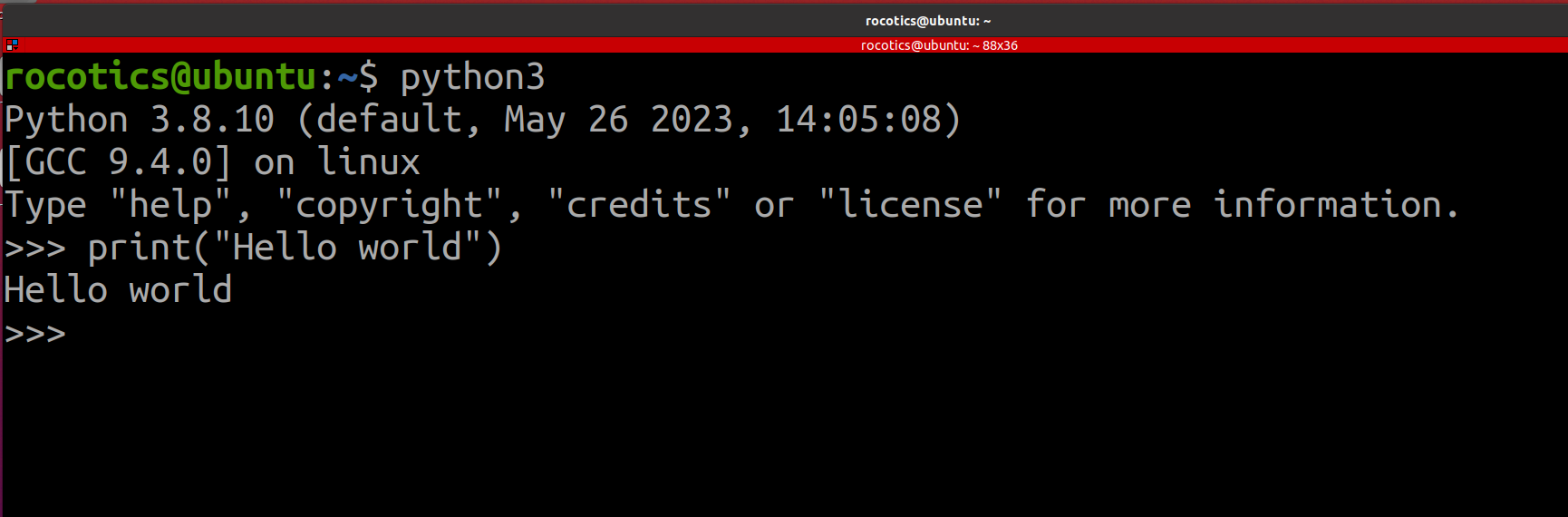
Or you can directly run Python scripts via terminal.
- Open a terminal: Ctrl + Alt + T
- Create a Python file:
gedit my_first_python.py - Save and close.
- Run:
python3 my_first_python.py
Through VSCode
You need an IDE for more complicated code. We use VSCode.
- Open Visual Studio Code
- File > New File > Python file
- Paste the code above
- Run (play button rigth above).
Functions
Simple function:
def main():
    print('Hello world')

if __name__ == '__main__':
    main()
Call a function inside another function:
def main():
    my_print_function()

def my_print_function():
    print('Hello world')

if __name__ == '__main__':
    main()
Rarely you define a function inside a function (nested function):
def outerFunction(text):
    text = text

    def innerFunction():
        print(text)

    innerFunction()

if __name__ == '__main__':
    outerFunction('Hello world')
Imports
Python comes with many built-in features, but most of the time you will use libraries (also called packages or modules) written by others. A library adds extra functions and classes to your script. To use a library, you must import it at the top of your file.
Import a whole library
Use import followed by the library name:
import numpy
import matplotlib.pyplot as plt
import rclpy
After importing, you call functions with a dot (.) in front of the name:
import numpy

my_array = numpy.array([1, 2, 3])
print(numpy.mean(my_array))
Import with a shorter name (alias)
Long names are tedious to type. You can give a library a shorter alias with as:
import numpy as np
import matplotlib.pyplot as plt

my_array = np.array([1, 2, 3])
plt.plot(my_array)
plt.show()
np and plt are very common aliases in Python tutorials and in this course.
Import only what you need
If you only need one function or class from a library, use from ... import ...:
from math import sqrt

print(sqrt(16))  # 4.0
You can import several names at once:
from math import sqrt, pi
This is how ROS 2 nodes are usually written:
import rclpy
from rclpy.node import Node
from geometry_msgs.msg import Twist
Here rclpy is the main ROS 2 library, Node is the class you inherit from to create a node, and Twist is a message type used to send velocity commands to a robot.
A small example with NumPy and Matplotlib
import numpy as np
import matplotlib.pyplot as plt

x = np.linspace(0, 10, 100)
y = np.sin(x)

plt.plot(x, y)
plt.xlabel('x')
plt.ylabel('sin(x)')
plt.title('A simple plot')
plt.show()
Install these libraries first if you do not have them:
pip3 install numpy matplotlib
Where to put imports
Always place import statements at the top of your file, before your own functions and code. This makes it clear which libraries your script depends on.
Import custom files in the directory
You are not limited to external libraries. Every .py file you write is also a module that can be imported - just like numpy or rclpy.
Two files in the same folder
Imagine you have these two files in the same directory:
my_project/
├── helpers.py
└── main.py
helpers.py
def greet(name):
    print(f'Hello, {name}!')
main.py
import helpers

helpers.greet('world')
Or import only the function you need:
from helpers import greet

greet('world')
Python finds helpers.py because it is in the same folder as main.py. You write the file name without the .py extension.
Run main.py from that folder:
cd my_project
python3 main.py
Import from a ROS 2 package
In ROS 2, your Python files usually live inside your package folder:
my_package/
└── my_package/
    ├── __init__.py
    ├── servo.py
    └── my_robot.py
Suppose servo.py contains a function you want to reuse:
def set_servo_angle(angle):
    print(f'Moving servo to {angle} degrees')
You can use it in my_robot.py:
from my_package.servo import set_servo_angle

def main():
    set_servo_angle(90)

if __name__ == '__main__':
    main()
Here the import path is my_package.servo because servo.py sits inside the my_package Python module (the inner folder with the same name as your ROS package).
After changing or adding files, rebuild and source your workspace:
cd ~/ros2_ws
colcon build
source install/setup.bash
The __init__.py file
For Python to treat a folder as a package (so you can write from my_package.servo import ...), that folder needs an __init__.py file. It can be completely empty - that is normal.
When you create a ROS 2 package with ros2 pkg create, this file is added automatically in the inner my_package/ folder. You usually do not need to edit it.
If __init__.py is missing, Python may not find your modules and you will get a ModuleNotFoundError even when servo.py is in the right place.
Import a node class from another file
In ROS, you sometimes import a class from one file and use it in another - for example, to test a publisher without running it as a standalone node:
from my_package.my_publisher import myPublisherNode
This works because of the if __name__ == '__main__': block at the bottom of my_publisher.py. When you run the file directly (python3 my_publisher.py), that block executes. When you import from it, only the class and functions are loaded - the main block is skipped.
Common mistakes
- ModuleNotFoundError - Python cannot find the file. Check that both files are in the correct folder, that you spelled the name correctly (no
.pyin the import), and that the package folder contains an__init__.pyfile. - Running from the wrong directory - For simple scripts, run
python3 main.pyfrom the folder that contains both files. - Forgot to rebuild in ROS - After adding a new
.pyfile to a ROS package, runcolcon buildandsource install/setup.bash.
Some common Python methods we use within ROS
ROS packages contain many files spread across folders (launch/, urdf/, config/, etc.). Two built-in Python tools help you find and reference those files: os.path.join and glob.
Build file paths with os.path.join
Never build paths by hand with strings like 'folder' + '/' + 'file.yaml'. Use os.path.join instead - it joins folder and file names in a way that works on any operating system.
import os

config_path = os.path.join('config', 'params.yaml')
full_path = os.path.join('/home/user/ros2_ws', 'src', 'my_package', 'config', 'params.yaml')
In ROS launch files, you often combine os.path.join with get_package_share_directory to locate files inside your package after it is installed:
import os
from ament_index_python.packages import get_package_share_directory

package_name = 'my_robot_pkg'
package_path = get_package_share_directory(package_name)

xacro_file = os.path.join(package_path, 'urdf', 'my_mobile_robot_simple.xacro')
rviz_config = os.path.join(package_path, 'config', 'config.rviz')
This pattern appears in launch files when loading URDF, RViz configs, Gazebo worlds, and similar resources.
More details: Python os.path.join
Find multiple files with glob
glob returns a list of file paths that match a pattern. The * wildcard means “any file name”.
from glob import glob

launch_files = glob('launch/*.launch.py')
print(launch_files)
# Example output: ['launch/my_launch.launch.py', 'launch/sim.launch.py']
This is especially useful in setup.py, where you must tell ROS which non-Python files to install. Instead of listing every file manually, you install everything in a folder that matches a pattern:
import os
from glob import glob
from setuptools import setup

package_name = 'my_package'

setup(
    name=package_name,
    # ...
    data_files=[
        ('share/ament_index/resource_index/packages',
            ['resource/' + package_name]),
        ('share/' + package_name, ['package.xml']),
        (os.path.join('share', package_name, 'launch'), glob(os.path.join('launch', '*.launch.py'))),
        (os.path.join('share', package_name, 'urdf'), glob(os.path.join('urdf', '*.xacro'))),
        (os.path.join('share', package_name, 'config'), glob(os.path.join('config', '*.yaml'))),
    ],
)
Each line says: “install all matching files from my source folder into the corresponding share/my_package/... folder.” You will add similar lines when your package gets launch files, URDF models, RViz configs, or Gazebo worlds.
More details: Python glob, finding files recursively with glob
Classes
A class is a blueprint for creating objects. An object bundles data (variables) and behaviour (functions) together. In ROS, almost every node is written as a class.
A simple class
class Robot:
    def __init__(self, name):
        self.name = name
        self.speed = 0.0

    def move(self, distance):
        print(f'{self.name} moved {distance} meters')

robot = Robot('TurtleBot')
robot.move(1.5)
Robotis the class name.robotis an object (also called an instance) created from that class.__init__is the constructor. It runs automatically when you create a new object.selfrefers to the current object. Use it to access the object’s variables and methods inside the class.
self and __init__
Every method inside a class takes self as the first parameter (except static methods - see below). Through self, you store data on the object:
class Robot:
    def __init__(self, name):
        self.name = name        # belongs to this robot
        self.battery = 100      # belongs to this robot

    def report_status(self):
        print(f'{self.name}: battery at {self.battery}%')
__init__ is where you set up the object - give it a name, create publishers, start timers, and so on.
Methods
Functions defined inside a class are called methods. You call them on an object with a dot:
robot = Robot('TurtleBot')
robot.report_status()
In ROS nodes, methods often handle callbacks - for example, timer_callback or a subscriber callback:
class myPublisherNode(Node):
    def __init__(self):
        super().__init__('my_publisher')
        self.create_timer(1.0, self.timer_callback)

    def timer_callback(self):
        self.get_logger().info('Hello from timer')
Static and class methods (rare in this course)
Most methods you write take self and work on a specific object. Two other types exist, but you will rarely need them in this course:
- Static method (
@staticmethod) - does not useself. It is just a function grouped inside the class for organisation. - Class method (
@classmethod) - receives the class itself (cls) instead of an object. Used when the method should work on the class, not on one instance.
You do not need to use these in your assignments, but you may see them in libraries.
Inheritance and super()
A class can inherit from another class and reuse its features. In ROS, your node inherits from Node:
from rclpy.node import Node
from std_msgs.msg import String

class myPublisherNode(Node):
    def __init__(self):
        super().__init__('my_publisher')
        self.pub = self.create_publisher(String, 'my_topic', 10)
Here myPublisherNode is the child class and Node is the parent class. The child gets all methods from the parent - such as create_publisher, create_subscription, and get_logger.
super().__init__(...) calls the parent’s constructor. Always call it first in __init__ so the ROS node is set up before you add your own code.
A simpler non-ROS example:
class Animal:
    def __init__(self, name):
        self.name = name

    def speak(self):
        print(f'{self.name} makes a sound')

class Dog(Animal):
    def __init__(self, name, breed):
        super().__init__(name)
        self.breed = breed

    def speak(self):
        print(f'{self.name} the {self.breed} says woof!')

dog = Dog('Buddy', 'labrador')
dog.speak()  # Buddy the labrador says woof!
Dog inherits name from Animal via super().__init__(name), and overrides speak with its own version.
Exercises
Exercise 1 - Create a simple class
Create a class called Servo with:
- An
__init__that takes anidand setsself.angleto0 - A method
set_angle(angle)that updatesself.angleand prints the new value
Create two servo objects and move them to different angles.
Exercise 2 - Inherit from a parent class
Create a parent class MobileRobot with __init__(self, name) and a method drive(self, speed) that prints the robot name and speed.
Create a child class WheeledRobot that inherits from MobileRobot, calls super().__init__(name) in its constructor, and adds a num_wheels attribute. Override drive to also print the number of wheels.